Skip to content
EN
Book a demo
Memberships & quotas

Your membership formulas, applied to the letter

Free play, reduced rates, booking priority, quotas by sport or by time: every club has its own formulas, and no two are alike. SportFinder sets them up once, then applies them to every booking — no exceptions to remember, no arguments at the desk.

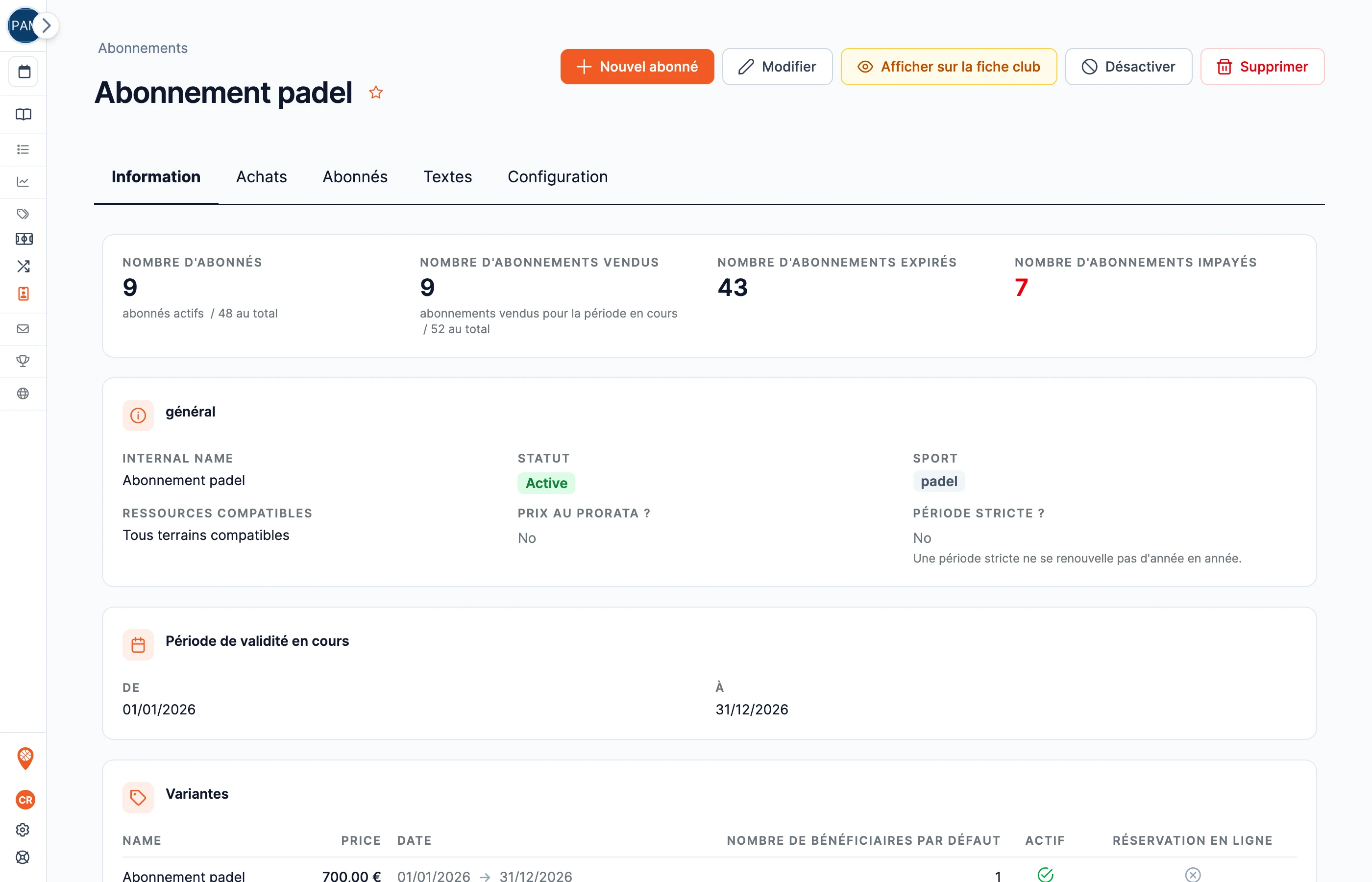
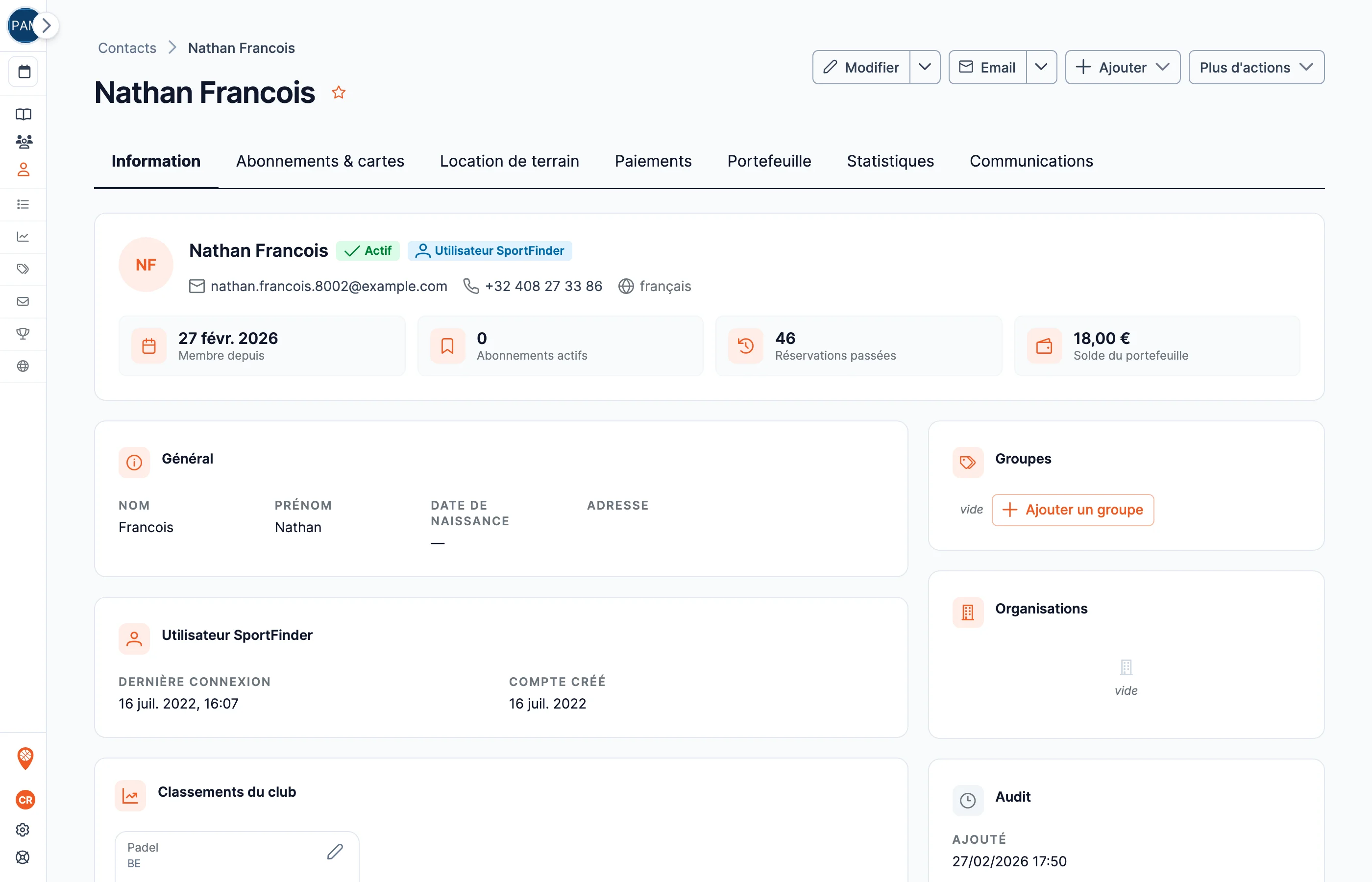
A membership record in the back office: formulas, rates and members
Two words, two tools

“Membership” does not mean the same thing in every club

The veterans’ team on Mondays at 7pm and the membership card that gives access to the reduced rate have nothing in common — except the name they are given at the desk. SportFinder handles both, separately, so each one does its job properly.

The recurring booking — a fixed slot

The same court, the same day, at the same time, over a whole period. It is a series of bookings set up from the calendar: each occurrence can be managed — cancelled, moved — without breaking the series. The tool for teams, schools and the Monday-night regulars.

The membership — a member status

A product the club sells, online or at the desk, which gives benefits to a named player: free play or reduced rates, booking priority, quotas. No fixed time — the member books whenever they like, and their benefits go with them.

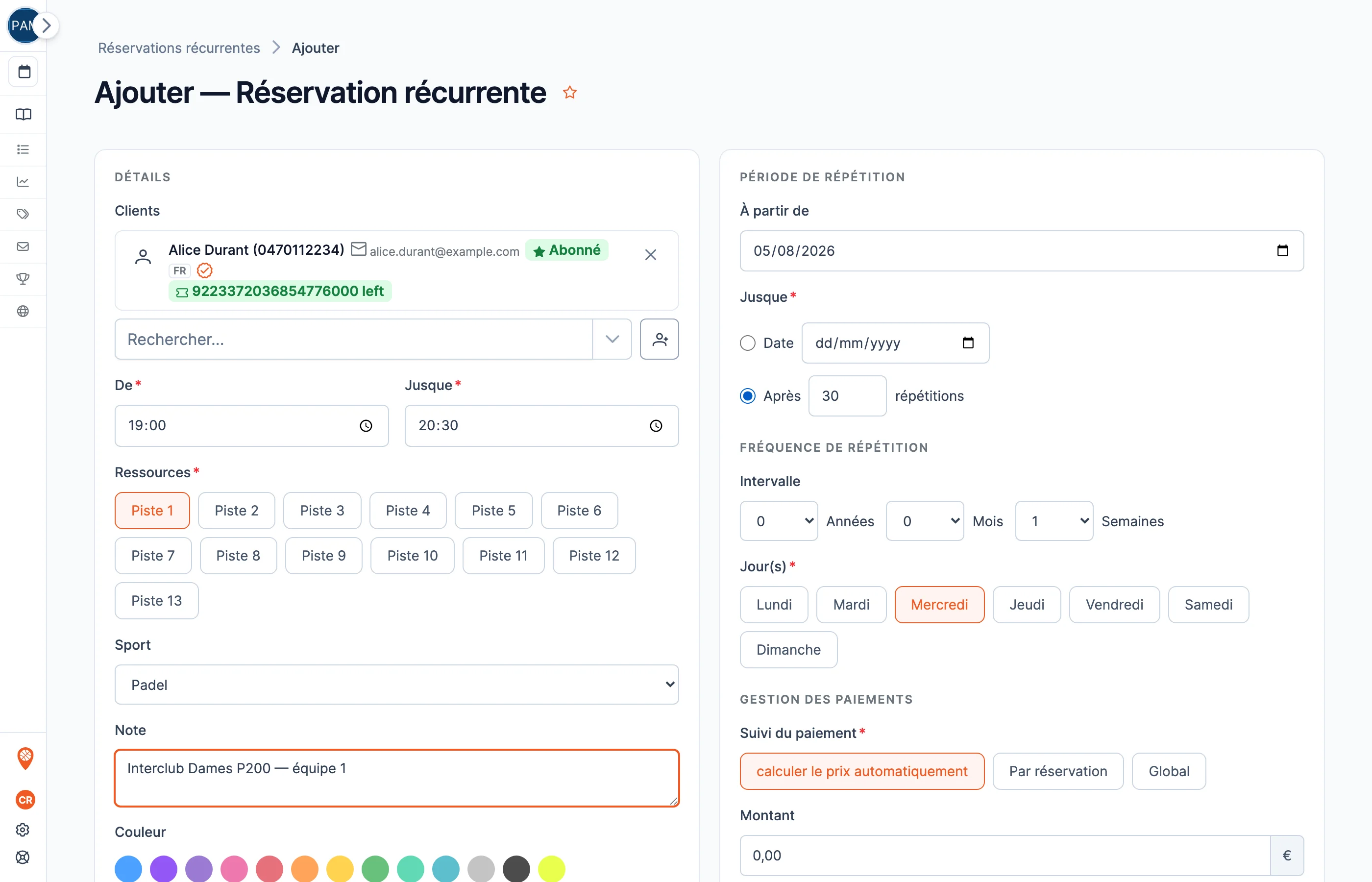
  • The form for creating a recurring booking in the back office: day, time, court and period
    Created from the calendar A day, a time, a court, a period — the fixed slot is set up once and for all.
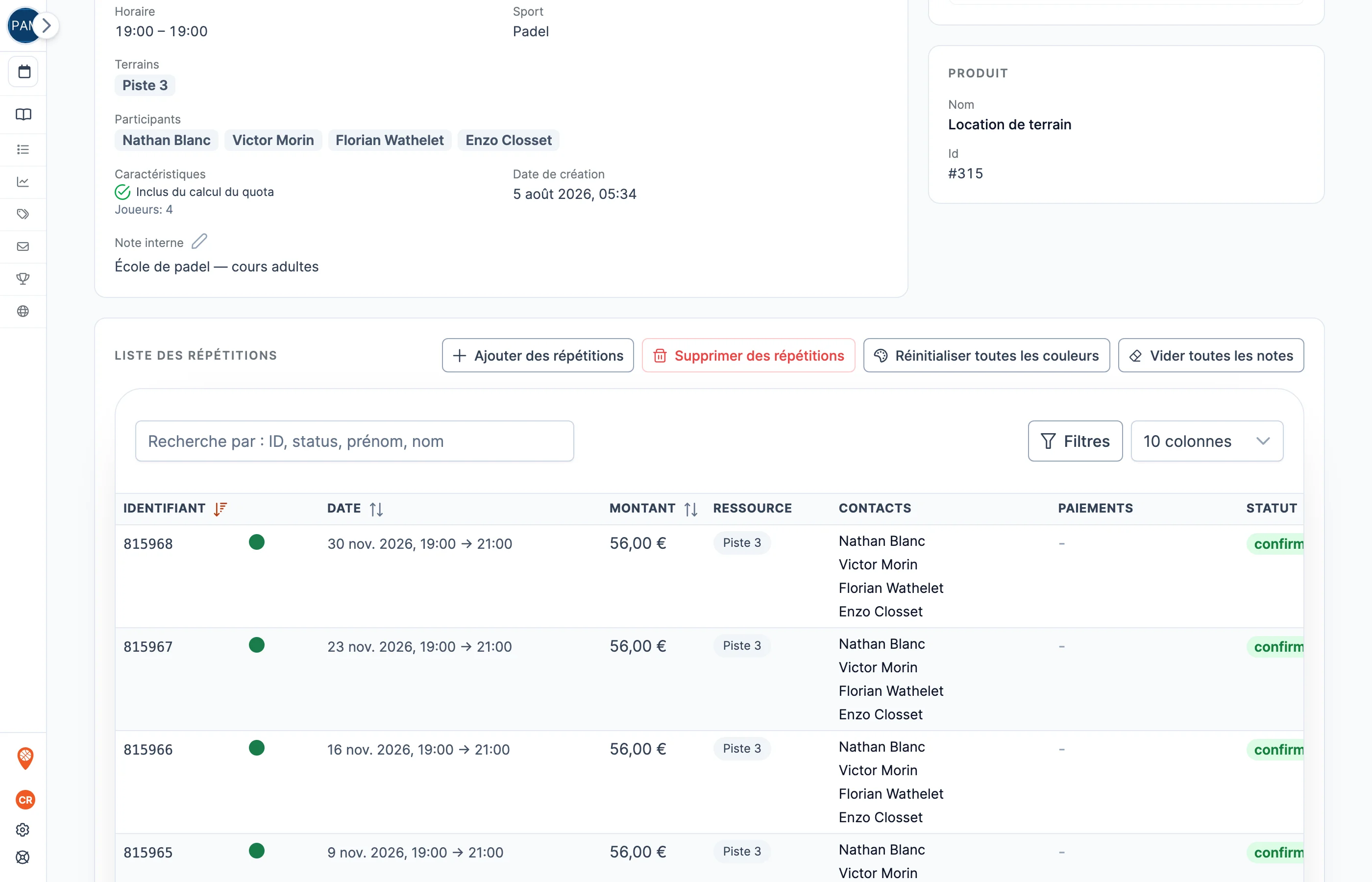
  • The list of occurrences of a recurring booking, week by week
    Every week has its occurrence A session cancelled or moved does not break the series: each occurrence is managed on its own.
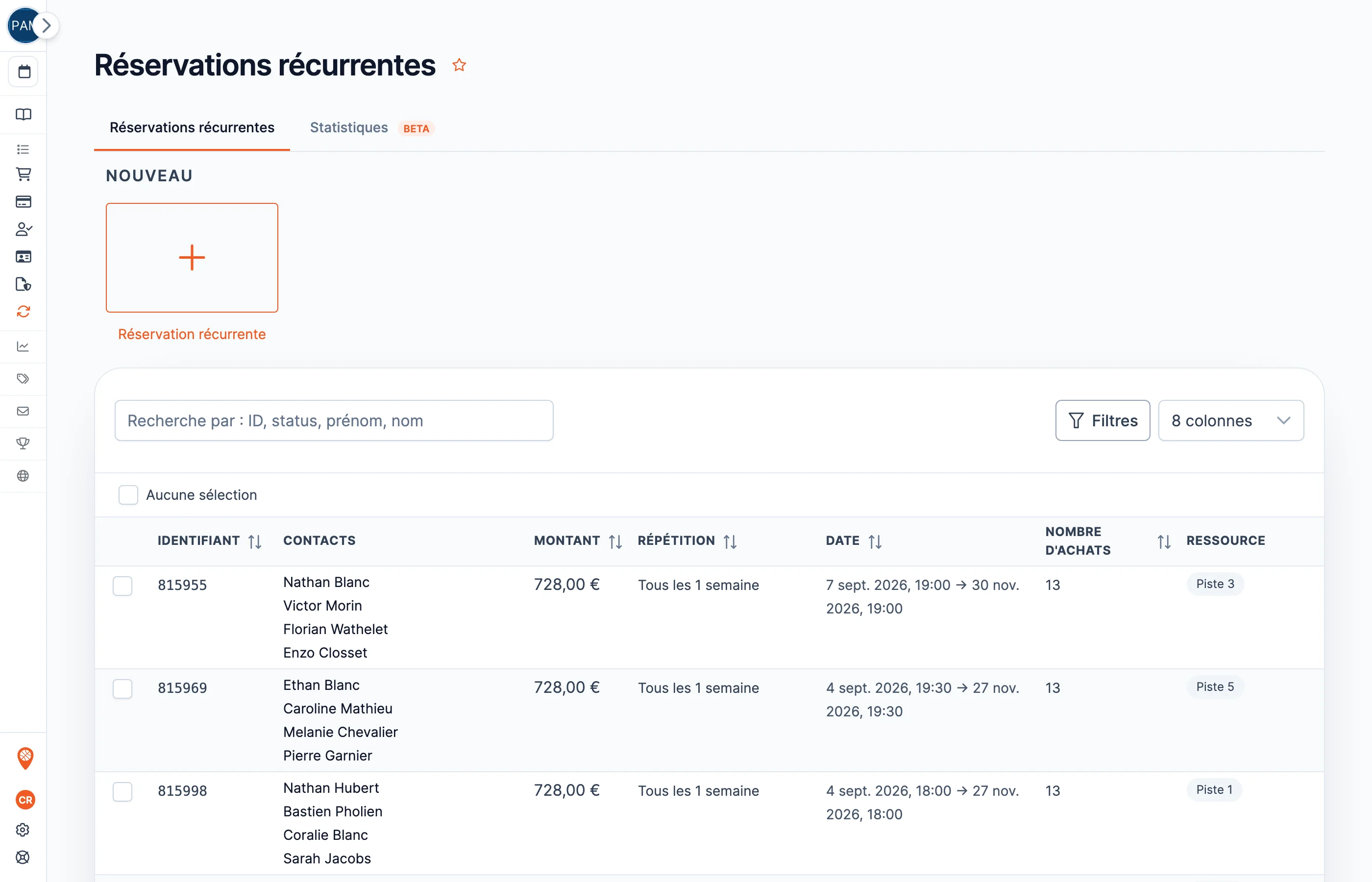
  • A club’s list of recurring bookings in the back office
    All your series, in one place The club’s fixed slots — teams, schools, regulars — can be reviewed from a single list.
The member status

What a membership can grant

A SportFinder membership is not a line in a spreadsheet: it is a set of rules the booking engine applies by itself, on every booking.

Free play and reduced rates

The price is calculated per player present: four members on court, €0; three members and a guest, only the guest pays their share. A fixed member rate, whatever the rest of the group, also exists — both models are configured per club.

Booking priority

The diary opens earlier for your members: they choose their slot before everyone else. The detail — why and how — is just below.

Included bookings, within a quota

So many free or member-rate bookings per day, per week, per month or per year — and beyond that, the rule you choose: block, or switch to a fallback rate.

Formulas that suit you

Several formulas per membership, each with its own price, label and number of beneficiaries — and a pro-rata price for anyone joining mid-season.

The booking window

Your members book before everyone else

A membership is only worth something if the member finds a court. The booking window sets how many days ahead the diary opens — and it can open earlier for your members. The Saturday 6pm slot goes to a member, not to a one-night visitor.

  • By membership: each formula can have its own window — the clearest benefit you can sell.
  • By time or by court: open off-peak hours earlier than peak hours, or an outdoor court earlier than the centre court.
  • Ordered rules: when several windows overlap, the priority you set decides — it is the same configuration engine as everything else.
Example configuration: how many days ahead the diary opens
Members D − 14
No membership D − 7

Two weeks ahead for members, one for everyone else — an example: each club sets its own windows, by formula, by time or by court.

Quotas

Included bookings, without ever giving your courts away

The quota is what makes a membership sellable: the member knows what they have, the club knows what it gives. Each quota counts bookings over the window of your choice — per day, per week, per month, per year, or at any one time.

Quota reached? You choose what happens next

A used-up quota is not necessarily a refusal. You can block the booking until the next window — or allow the overrun at a fallback rate: the member keeps playing, the court keeps selling, and the membership benefit keeps its value.

  • Nothing is counted before payment: a booking abandoned along the way never costs a unit of quota — and a cancellation gives it back.
  • The count is pro rata: a 90-minute booking that overlaps your peak hours by only 30 minutes uses only those 30 minutes of the “peak hours” quota.
  • The last minute can be relaxed: an exception rule can widen the quota at the end of the day — a member whose counter is full fills a court that would otherwise have stayed empty.
  • Lessons do not count: the quota only counts court hire. A lesson or a camp never eats into the included bookings.
Example: 2 member bookings per week, overrun allowed

1 used · 1 left this week

  • Quota available €0 — covered by the membership
  • Quota used up €4 — member fallback rate
  • No membership €5 — full rate

Example prices. Each switch is a setting: block, or let them play at your fallback rate.

A quota cut to the exact criterion

Each quota carries its own criteria, and several quotas can coexist — the one with the highest priority applies. Enough to write your club’s exact rule, not an approximation.

By sport

Two padel bookings a week, without touching squash: a multi-sport centre sets each discipline separately.

By time

A tight quota at peak hours, a generous one off-peak — your members fill the slots that need it.

By court

The centre court outside the member quota, the outdoor courts included — or the other way round: the counter can target only certain resources.

By member group

Your contact groups act as a filter: one quota for the padel school, another for competitive players, another for everyone else.

By membership formula

The entry formula opens two bookings a week, the higher formula four: the quota is tied to the product you sell.

Shared across your sites

A group of clubs can pool the counter: the member uses their quota at either site, with a single reset.

The right question

A member is revenue that returns

A membership takes the money at the start of the period and brings the player back all season — cash flow you can plan, courts that fill up during the week. What your formulas could bring in at your club, we work out on the demo, using your data.

  • Sold online and at the desk: the membership is a product in your catalogue, available to buy around the clock.
  • Benefits people can see: the member sees their rate and their priority on every booking — the membership renews itself when it is genuinely useful.
  • Rules that protect the club: quotas and windows stop the benefits you grant from cannibalising your best hours.
Memberships in action

A booking between members, screen by screen

One player books and names their three partners. Each player’s membership applies automatically — and nobody else needs a SportFinder account.

  • Only one player does the booking: they book, name the others, and each member drops to €0 or to their member rate.
  • No account required for partners: a membership taken out at the desk counts just as much as one bought online — handy for older players and regulars without a smartphone.
  • The club takes the membership payment directly: the sale can happen with you, at the club, and the player benefits from the very next booking.
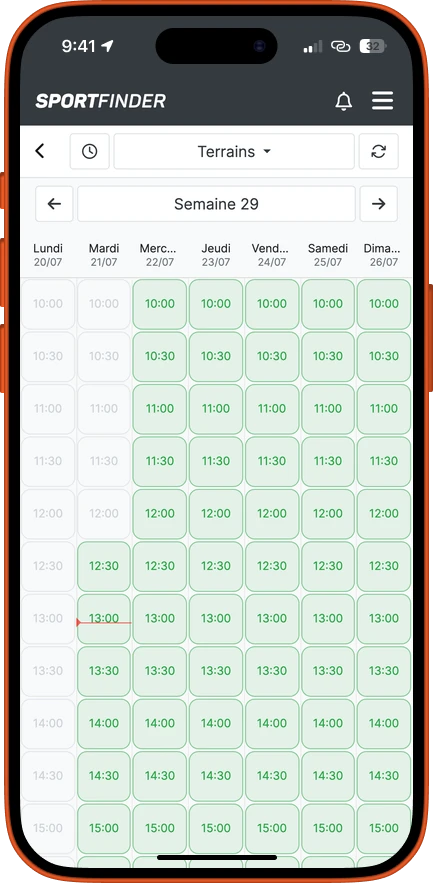
  • The club’s booking calendar in the app, with the week’s available slots
    1 The club calendar The member picks their slot like any other player.
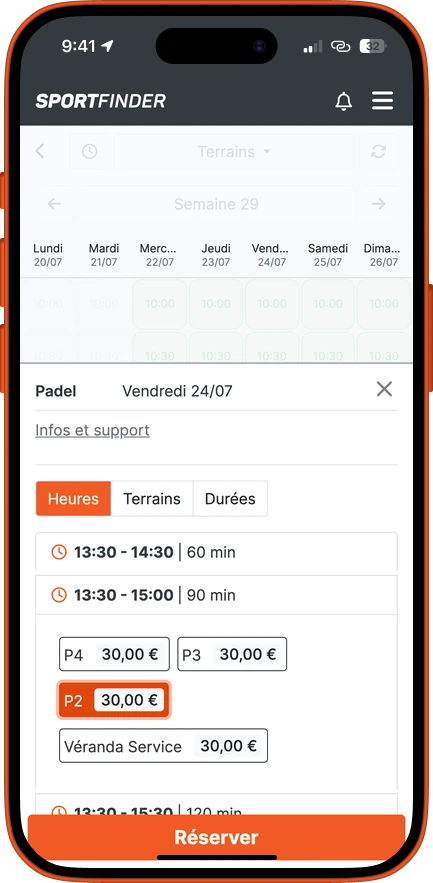
  • Choosing the time, duration and court, with the rate shown
    2 Time, duration, court The rate shown is still the full rate: the membership only applies to named players.
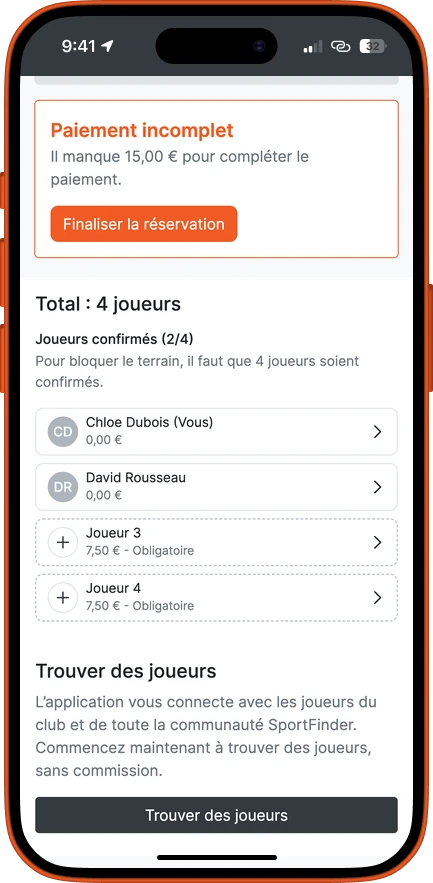
  • The player list: two members at €0, two places left with their share to pay
    3 The partners are named Members drop to €0; an unnamed place keeps its share to pay.
  • Four players confirmed, all at €0 thanks to their membership
    4 Four members, €0 All four players are covered by their membership: nothing left to pay.
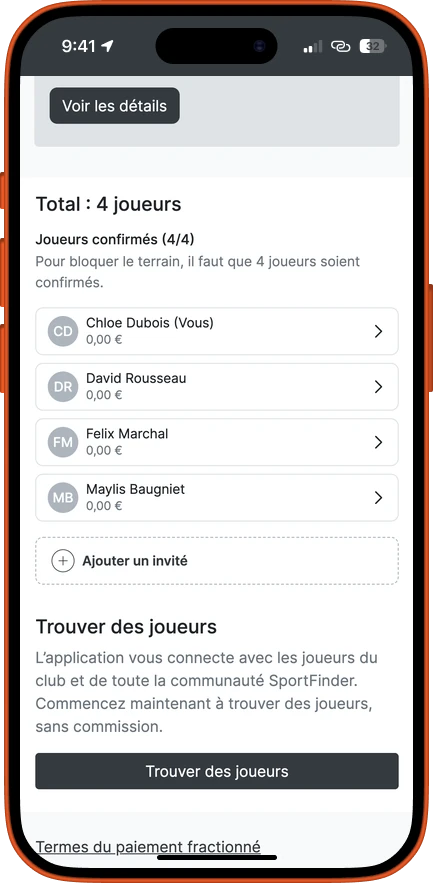
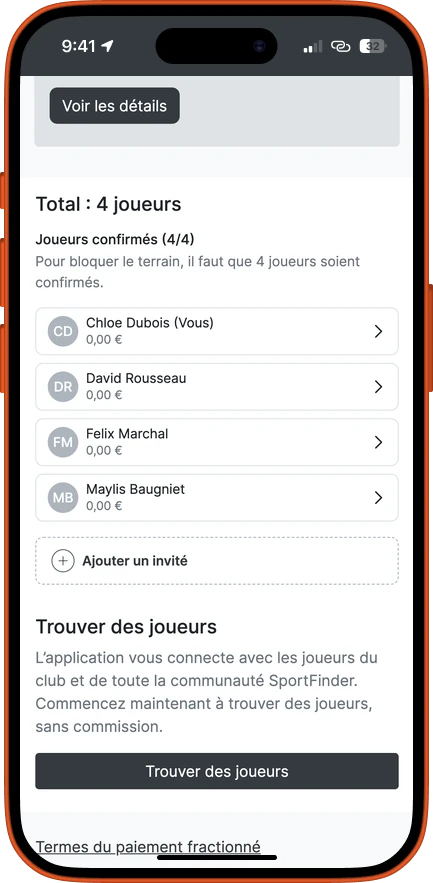
  • The booking summary: four players confirmed out of four
    5 The summary The court is locked in once the group is complete — the rule is spelt out in black and white.
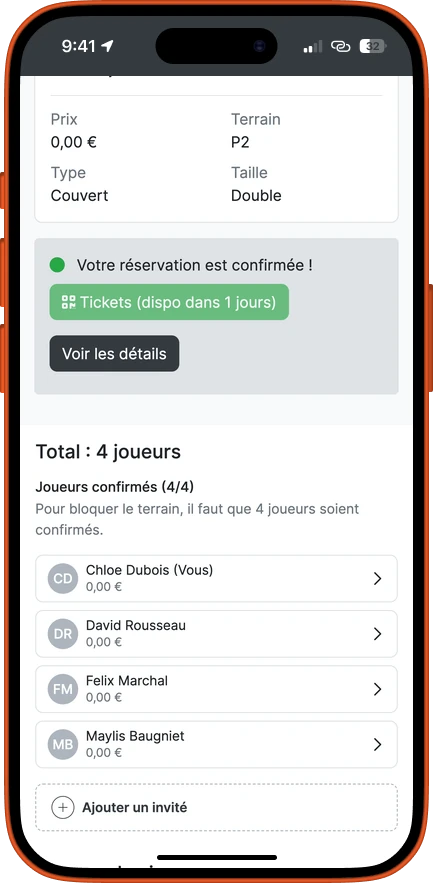
  • The booking confirmed at €0, with the court assigned and the access tickets to come
    6 Confirmed, court assigned Nobody got their card out: the session is covered by the memberships.
Player confirmation

The club sets the rules

Who has to confirm for the court to be locked in? Two modes, a slider between ease and control — and the choice is yours.

Flexible

Recommended

The person booking enters their partners’ names; the booking is confirmed instantly.

Strengths
Fast — the court is locked in within a minute.
Low effort — no back-and-forth between players.
Limitation
Easier to abuse — nothing stops someone naming a member who is not there.

Manual

Each named player confirms their own participation before the court is locked in.

Strengths
Less abuse — each membership is committed by its holder.
Security and exclusivity — the member benefit stays with members.
Limitation
Slower — every player has to confirm for the court to be locked in.

And it is not an all-or-nothing choice for the whole club: the configuration engine adapts the rule case by case — by formula, by time, by group. Misuse is dealt with without drama: less priority, more control.

Preventing misuse

The membership card, without the plastic

A lent membership is a member rate given to someone who has not paid for it. The answer fits in a photo: the club can ask each member to complete their virtual membership card, ID photo included.

  • The photo collects itself: the player supplies it from their profile, with automatic reminders until the card is complete.
  • Checks happen on court: name, photo, membership — the player’s record settles it at a glance, without confrontation.
  • Required before booking: the club can make booking conditional on a complete membership card.
A contact record in the back office: identity, memberships and history
Frequently asked questions

Memberships, recurring bookings and quotas

“Membership” or “recurring booking”: which do I need?

If your regulars want the same court at the same time every week, that is a recurring booking: a series of bookings set up from the calendar. If you want to sell a member status — reduced rates, booking priority, quotas — that is a membership. SportFinder handles both, and many clubs combine them: a recurring booking for the slot, a membership for the benefits.

Do all my members need a SportFinder account?

No. A single player books and names their partners: each person’s membership applies automatically, account or not. A membership taken out at the club desk counts just as much as one bought online — handy for regulars who do not want an app.

What happens when a member reaches their quota?

You decide. Either the booking is blocked until the next window, or it switches to a fallback rate you set: the member keeps playing, paying their share. And the quota can be relaxed at the last minute, so that a court that is still free does not stay that way.

Does a lesson or a camp use up the quota?

No. The quota only counts court hire: a member who takes a lesson or signs up for a camp does not see their included bookings shrink as a result.

How do I stop a membership being lent or shared?

Three safeguards, to be balanced to suit your club: named bookings (each place is tied to an identified player), the confirmation mode — instant or player by player — and the virtual membership card with photo, which makes an identity check on court immediate.

Memberships are part of our padel club management software, alongside online booking and payments & point of sale. Sales and renewals can be followed in your statistics, and every rule — window, quota, confirmation — is set club by club. Your club is also visible in the SportFinder directory.

We set up one of your formulas live

30 minutes, your real formulas: we set up a membership — rates, priority, quotas — and watch it apply to a booking.